
PLATPLAY STUDIO
Everything your screens show starts here.
PlatPlay Studio is a digital signage CMS: one web console for every screen you own, from menu boards to video walls. Build once, schedule anywhere and see what is playing right now.





Upload once. Use everywhere.
One library sits behind every screen. Replace a file once and every playlist that uses it updates on its own.
Media
Images, video, web links and documents, with versions.
Playlists
Order, duration and format, reused across sites.
Archive
Retire a campaign and bring it back next season.
One screen. Many zones.
Give each region its own source. Compose the layout once and it stays live as the data behind it changes.


- Videolobby-welcome-loop.mp4, from your Library
- Live chartSales by region, from your database
- DesignAutumn sale, synced from Canva
- Webhook feedOrder status, pushed by your system
- WeatherIstanbul, refreshed every 15 minutes
Decide what plays and when.
Timers start and close playback on a schedule. Choose the days each one repeats and the volume it plays at.

Start and close
Set the time each timer starts and closes playback.
Repeat
Every day, Monday - Friday or One Time.
Volume
Give every timer its own volume.
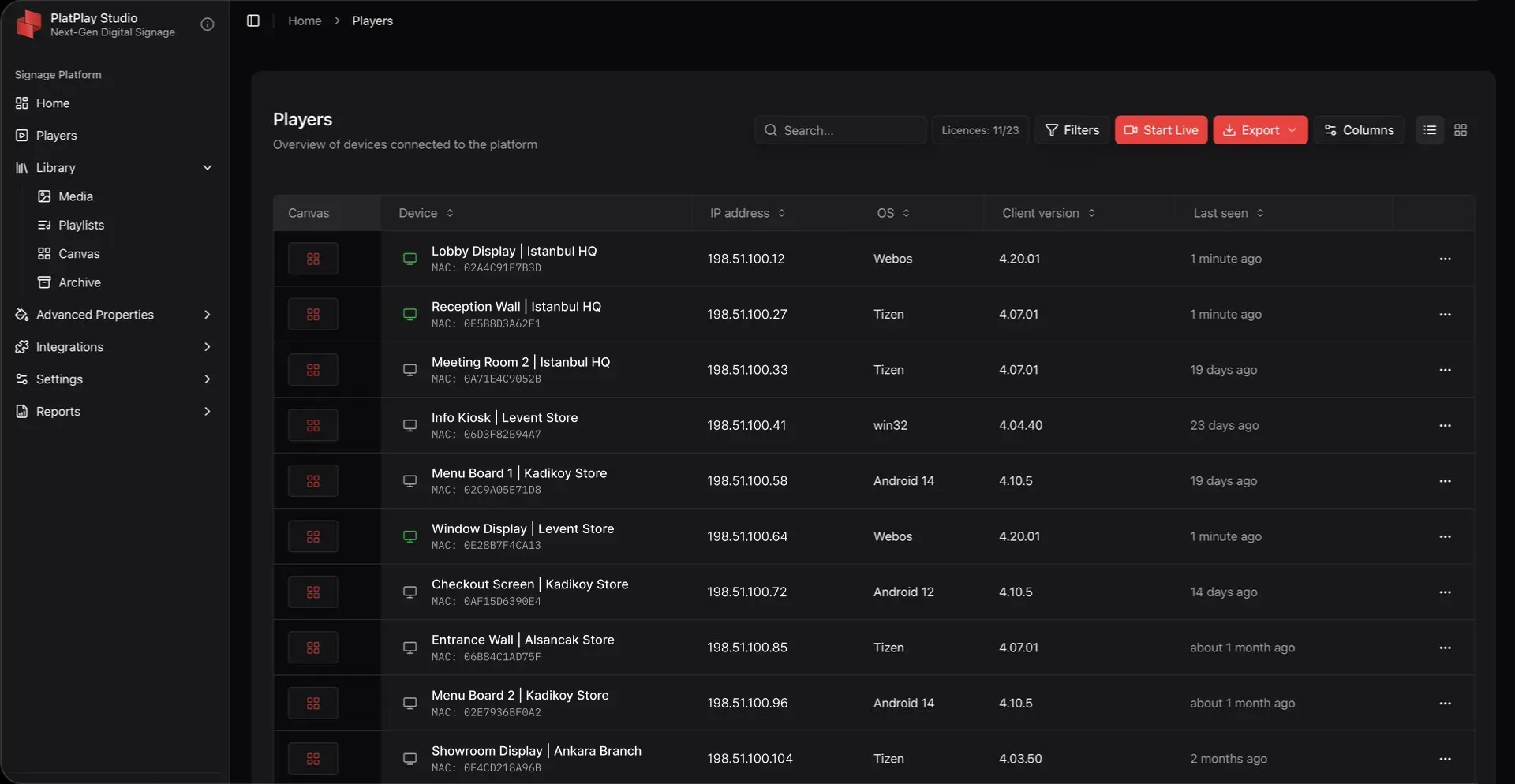
Every player, one list.
Overview of every device connected to the platform, with its IP address, OS, client version and when it was last seen. Search, filter and export from the same list.
Every display needs a player. Use the one inside your screen or take ours.
See PlatPlay BoxPut live data on your screens.
Connect what you already run. Your systems hold the figures and Studio puts them on the wall the moment they change.
Canva
Design it in Canva, preview it in Studio. Every edit reaches every screen.
Database connection
Live figures, shown as graphics.
Webhooks
Triggered by your systems.
Widgets
Weather, finance, traffic.
API keys
Connect your own tools.
Weblinks
A live page, kept on screen.

Built for everyone.
The parts of Studio the people who keep the network running ask about first.
Keeps playing offline
Players keep running the schedule they have when the connection drops.
Remote control
Publish, replace and troubleshoot content without visiting the site.
Profiles and users
Decide what each user can see and change.
Groups
Organize players by site, region or purpose and publish to a group.
Reports
Offline, download, play, channel and playlist reports.
Audit logs
See who changed what in Studio.
Cloud or on-premise
Run Studio in the cloud or on your own servers, with licence use at a glance.
Email notifications
Hear from Studio when a player needs attention.